
Minecraft Font TTF Download
Download Monocraft, a Minecraft-inspired TTF font, or choose a retro pixel alternative. Get the font file for apps that support custom fonts, then try the online preview to make text images and 3D logos.
Download Monocraft TTFFree TTF downloads · No sign-up · Font licenses included
Choose your Minecraft-style TTF font
Monocraft is the Minecraft-inspired option. Press Start 2P and Silkscreen are alternative pixel fonts with their own styles. Each download is an unmodified, regular-weight TTF file, with its author and SIL Open Font License linked below.
Monocraft
A monospaced font inspired by Minecraft lettering. Start here for Minecraft-style text in your design app.
Regular · TTF · 210 KB
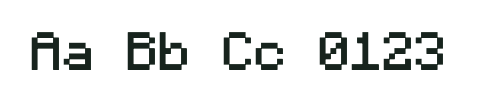
Idrees Hassan · SIL OFL 1.1
Press Start 2P
Wide, retro arcade lettering. An alternative for bold game titles rather than a replica of Minecraft text.
Regular · TTF · 118 KB

CodeMan38 · SIL OFL 1.1
Silkscreen
Compact pixel lettering for short labels and subtitles. A different retro style for supporting text.
Regular · TTF · 32 KB
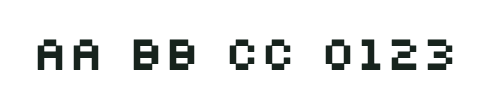
Jason Kottke · SIL OFL 1.1
How to install a Minecraft-style TTF font
Install on Windows
Windows: download a TTF, right-click it and choose Install. Restart your design app if the font does not appear.
Install on macOS
macOS: open the TTF in Font Book and choose Install. Select the downloaded font by its name in an app that supports custom fonts.
After installation, select the font by its own name: Monocraft, Press Start 2P or Silkscreen. Installing a TTF makes it available to compatible apps; it does not automatically change Minecraft’s in-game text.
Preview Minecraft-style fonts and make PNG text
Try your text before downloading a font, or use the Minecraft-style logo maker to build a finished image. Start from a template, edit up to eight text layers, and add gradients, double outlines or 3D depth.
Start with a complete design
Original pixel scenes with editable titles and subtitles. Choose a template, then make it yours.
Project files include every layer, setting and background image. Importing or using a template replaces the current design and starts a new undo history—save your project first if you want to keep it. JSON files up to 16 MB; everything stays in your browser.
Up to 120 characters. Long lines wrap at your chosen width.
Layer position
Text & layout
Outline & pixel shadow
3D block lettering
Add solid depth and slant to your title. Start with the 3D stone preset, then adjust the controls below.
Background
Transparency removes the solid color only. Remove your image to export text on its own.
PNG, JPG or WebP · up to 10 MB, 4,096 px per side and 16 megapixels. Images are processed in this tab; use Save project to include one in a project file.
Saved in this browser. Background images are not saved.
Undo restores text, layers and settings in this session. Background image uploads are not included.
To export text without a background, enable Transparent background and remove any background image. Choose 1×, 2× or 4× and check the displayed pixel dimensions before downloading. Save a project JSON to keep editable layers and the background image together.
Minecraft font TTF download FAQ
Is this the official Minecraft font?
No. These are independently created pixel fonts. Monocraft is Minecraft-inspired; none of the fonts or this tool is endorsed by Mojang or Microsoft.
Are these Minecraft-style TTF downloads free?
Yes. All three TTF downloads are free and require no account. The online preview, PNG export and project save/import are also free. Each font’s license is available beside its download.
Can I use the font in commercial designs?
All three fonts use SIL OFL 1.1, which permits commercial use and redistribution subject to its terms. Keep each font’s copyright and license when redistributing it; fonts cannot be sold by themselves. Read the license linked beside each download.
Does the PNG download include the font?
No. PNG is a finished image. Download the TTF separately to type editable text in another app.
Can I copy and paste the result into Minecraft chat?
This tool exports PNG images and TTF font files, not styled Unicode text or Minecraft formatting codes. A PNG can be used in a thumbnail or banner; a TTF is for editable text in an app that supports custom fonts.
Do these TTF fonts include Chinese characters or emoji?
The bundled pixel fonts do not include Chinese characters, and support for other characters varies by font. The preview lists unsupported characters and displays them with a system fallback, which may look different from the pixel font.