
No Guidance Dance AI
Do the Train Dance From Your Photo
Turn your photo into a No Guidance train dance video. Upload a clear solo photo to recreate the platform dance, choose 480p or 720p and an original beat or silent audio, then preview and download your clip.
Upload your photo
One person · JPG, PNG or WebP · Up to 10 MB
Photo tips
- One person, full body, with face and shoes visible
- Even lighting, no obstructions or beauty filters
- Wear the outfit you want in your video
- About 11 seconds of dancing
- Optional original beat
- 9:16 for TikTok and Reels
- No added site watermark
Credits are returned if generation fails.
Download includes an original beat, not the No Guidance song.
What is the No Guidance train dance?
Set to Chris Brown and Drake’s “No Guidance”, this TikTok dance returned in autumn 2026 with the viral train-platform version. Its signature moves combine hands held behind the head, wide hip swings and a direct look into the camera. Upload one photo to take the dancer’s place in the No Guidance train dance reel.
Also called: No Guidance challenge · No Guidance train dance
Real Results Generated With No Guidance Dance AI
Each video below was generated on this site using the uploaded photo shown beneath it. Compare the input photo with the actual result.
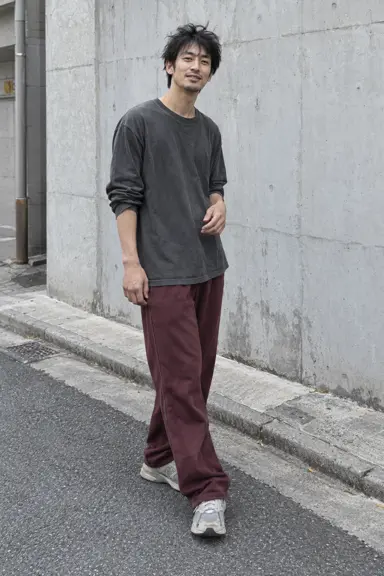
Input photo used to generate this video
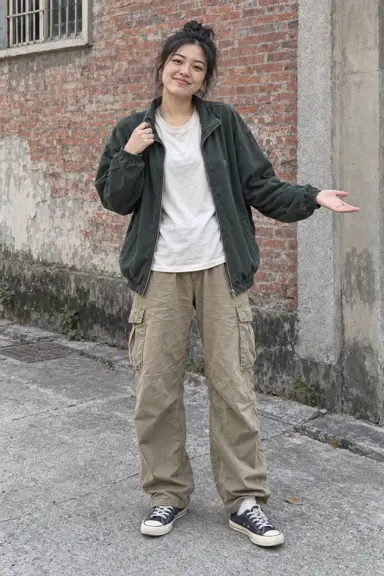
Input photo used to generate this video
How to use No Guidance Dance AI
Choose one clear photo, select 480p or 720p, and generate with our original beat or select Mute. Sign in to submit; your photo stays selected while you sign in. Track the result in your creations and download when ready.
- 01
Upload your photo
Choose a clear full-body photo of one person.
- 02
Generate your dance
Choose 480p or 720p and tap Generate.
- 03
Watch and download
Open your creation to follow progress, watch the result or make another video. Post tip: downloads use our original beat so they're safe to repost anywhere. For maximum reach, upload to TikTok or Reels with the sound muted, then add the official 'No Guidance' sound from the app's sound library.
Choosing a photo for your No Guidance dance
For the Solo version, upload a single photo.
- Make your face easy to see: Choose a crisp image taken in good light, with your face looking towards the camera. Because the dancer occupies a small part of many train-video frames, facial detail is more useful than a particular full-body pose.
- Choose the outfit for your video: The dancer wears the clothing shown in your upload, so photograph yourself in the outfit you want in the dance. For the best view of it, use a portrait framed from the knees upwards or a full-length photo.
- Keep the photo to one person, with the face uncovered: remove sunglasses and masks, and use an image without a beauty filter.
- Only adults may appear in this template. Choose a photo of yourself or another adult who has given permission; celebrity photos and photos of strangers are not allowed.
Where did the No Guidance Dance trend start?
The No Guidance challenge grew out of two releases: Chris Brown’s 2019 song featuring Drake, whose music video shows the pair in a dance battle, and Ayzha Nyree’s 2020 remix. The remix became popular on TikTok, where people recorded their own routines, often crossing their arms during “play no games”. The figures recorded for 21 October 2026 were 8,916 TikTok videos under #noguidancechallenge and 29,325 under #noguidance, with 544.6 million views for the latter.
The routine continued to circulate before the train-platform version appeared. A Bay Area duo’s street-corner performance reached 2.4 million views on 23 March 2026. Sydney creator @zacjeremiah regularly dances on platforms as his train departs. For his No Guidance reel on 6 October 2026, a friend recorded him from inside the moving train; that video received 1.3 million views and 171,700 likes.
The next adaptations used the same sound with face replacement. Beginning on 18 October, CapCut posts showed celebrity faces on a man dancing along a train aisle. No Guidance dance templates then appeared on AI video sites on 21 October. Here, the face used in the video is your own.
2019
The release pairs Chris Brown with Drake on “No Guidance”; their dance battle closes the music video.
2020
TikTok users take up a new dance challenge after Ayzha Nyree’s remix gains popularity.
2026-03-23
A street-corner No Guidance performance by a Bay Area duo draws 2.4 million views.
2026-10-06
A departing train provides the viewpoint for @zacjeremiah’s No Guidance performance on a Sydney platform. By 21 October, the reel has 1.3 million views.
2026-10-18
Posts labelled CapCut “No Guidance dance AI template” start showing a train-aisle dancer with celebrity faces added.
2026-10-21
No Guidance templates arrive on AI video sites. At this point, TikTok’s #noguidance totals 29,325 videos and 544.6 million views.
Sources: Chris Brown — official No Guidance video · Ayzha Nyree — No Guidance Remix on Spotify · @zacjeremiah — original train-platform reel
How many credits does a video cost?
Each video costs 444 credits at the default 480p, or 951 credits at 720p. Sign in and have enough credits before submitting. Each new generation is a separate paid task.
| Your photo | A clear solo full-body photo works best. Show your face, outfit and shoes. JPG, PNG or WebP, up to 10 MB. |
|---|---|
| Your video | About 11 seconds of dancing · MP4 · 9:16 |
| 480p | 444 credits |
| 720p | 951 credits |
What happens in the No Guidance dance video, second by second?
Your solo train dance video features these moves:
| Time | Solo (11 s, the train platform) |
|---|---|
| 0–1.5 s | You run in across the platform as the train moves. |
| 1.5–5 s | Hands behind the head, elbows wide, big hip swings. |
| 5–8 s | A hand on the head, a knee lift, hip rolls, a turn. |
| 8–11 s | You face the train and look straight into the lens. |
Upload a photo to create your solo train dance video. Choose 480p or 720p, with an original beat or muted audio. Check the credit cost before generating, then preview and download your video.
What is the No Guidance train dance, and is it a CapCut filter?
The No Guidance train dance is the October 2026 version of the trend: a dancer performs on a platform while passengers film through the window of a departing train. Sydney creator @zacjeremiah became known for these videos. Upload a photo to create a video of yourself doing the No Guidance dance at the station.
AI edits form another branch of the trend. Posts use names such as No Guidance dance template and No Guidance AI trend for a CapCut No Guidance dance filter that places a celebrity’s face on a male dancer in a train aisle; the setting is sometimes described as an airplane cabin. Together with the No Guidance dance guy train clips, these edits are more of a no guidance guy dancing meme than a dance routine. To make your own version here, upload your photo: no CapCut template or app installation is needed, and the resulting No Guidance dance features you. Any editor can be used afterwards to add your own No Guidance dance edit.
Which sound and hashtags should you post it with?
Your clip comes with our original beat, not the Chris Brown / Drake recording. You can choose Mute video before generating and pick a No Guidance TikTok dance sound yourself when you post. On TikTok most No Guidance remix TikTok dance posts use the Ayzha Nyree remix. The song belongs to its owners, and this tool gives you no rights to it. Music rules differ from platform to platform, so check them before you use the clip in an ad or a paid post.
For No Guidance dance TikTok posts, the largest tag is #noguidance: 29,325 videos and 544.6 million views as of 21 October 2026. Next are #noguidancechallenge with 8,916 videos and #noguidancedance with 485. Leave the platform’s AI-content label enabled.
What goes wrong, and how do you fix it?
| Problem | Fix |
|---|---|
| The person in the video does not quite look like you | Upload a clear, front-facing solo photo with even lighting. Avoid covered faces and beauty filters. |
| The hairstyle or hair color looks different | Use a photo that clearly shows your hairstyle and hair color. AI results can vary. Each new generation costs additional credits. |
| Your clothes look different | The video takes the clothes from your photo. A photo from the knees up shows them best. |
| The photo could not be used to generate a video | Some photos get refused. The credits come back; try another photo. |
Questions about the dance
What is No Guidance Dance AI?
Upload one photo to create your own No Guidance train dance: a solo dancer on a station platform, seen through a moving train window. This page makes the solo version.
What are the video settings?
An approximately 11-second vertical 9:16 video, available in 480p or 720p and ready to share.
Does the video include sound?
Your download includes our original beat by default. Select Mute for a silent clip, then add the official sound in TikTok / Reels if you want the song.
Will every move and face be exact?
AI results vary, especially during turns, hand gestures and passing columns or window reflections. Faces, outfits and movement may differ from your photo or the example. Preview your result before sharing.
How many credits does a video cost?
Each video costs 444 credits at the default 480p, or 951 credits at 720p. Sign in and have enough credits before submitting. Each new generation is a separate paid task.
View credit packsDoes my clip include the No Guidance song?
No. Your download comes with an original beat we produced and cleared for use in your clip. It is not "No Guidance" by Chris Brown and Drake, and it is not the Ayzha Nyree remix. Those songs belong to their labels and we don't have the rights to give you. If you want the real song, post the video to TikTok or Reels and add the official sound there — that also helps the clip spread.
Can I use someone else's photo?
Use a photo of yourself, or of an adult who agreed to be in your video. Don't upload photos of other people without their permission.